Perplexity
Designing a new 0->1 feature that lets users store text directly into their personal workspace
Role
Product Designer
Timeline
10 weeks
Team
2 PMs, 3 Designers, 2 Marketers
CONTEXT
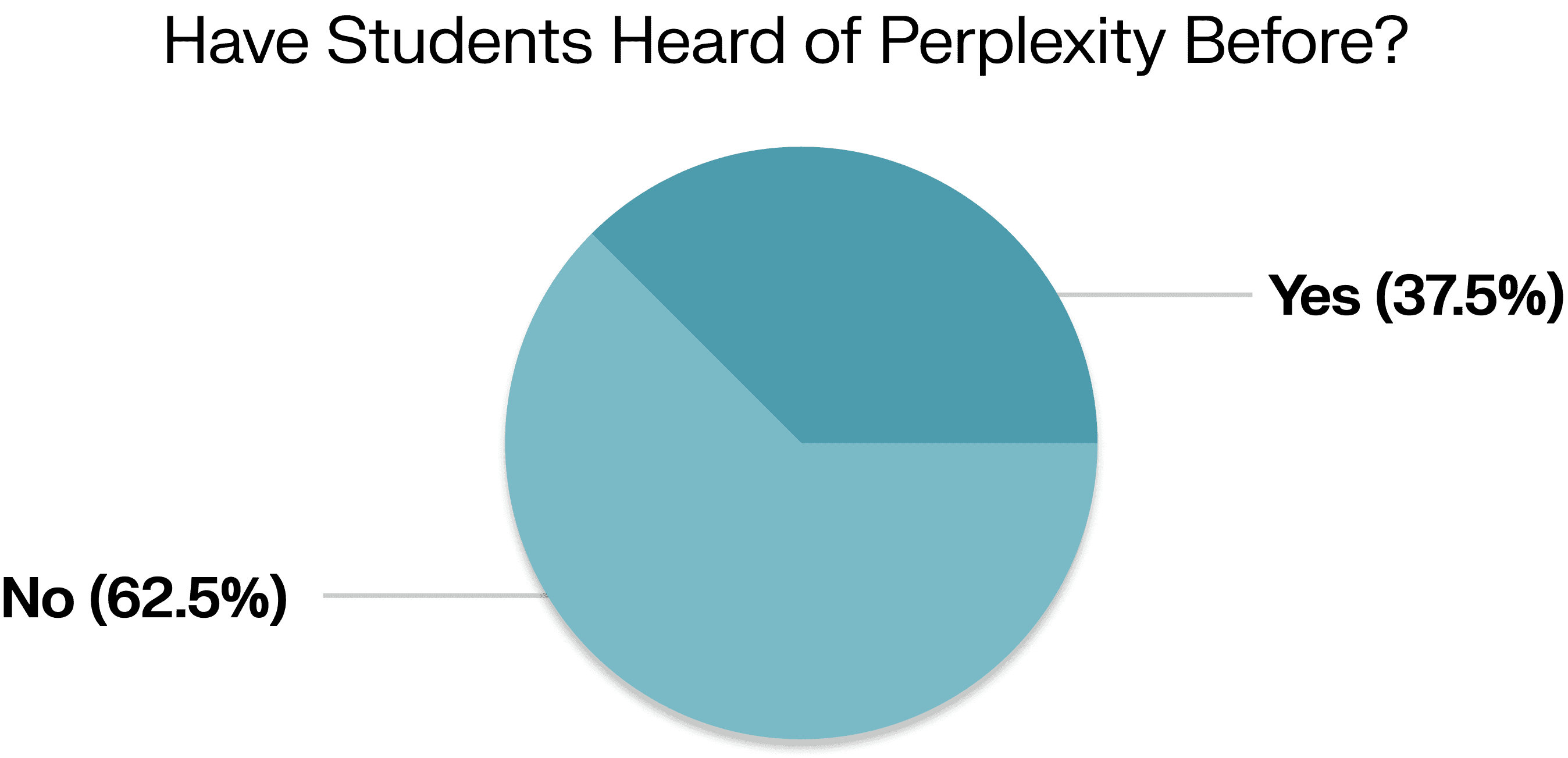
Perplexity is an AI-powered search engine with 15M+ users, designed to deliver detailed, reliable answers.
The Perplexity team tasked our team at UCLA Product Space to reimagine how Perplexity could improve student engagement.
CONTEXT
Perplexity is an AI-powered search engine with 15M+ users, designed to deliver detailed, reliable answers.
The Perplexity team tasked our team at UCLA Product Space to reimagine how Perplexity could improve student engagement.
THE PROBLEM
Although the platform is actively growing, many students still choose to use other AI tools instead when researching or creating content. This motivates the question:
How might we increase Perplexity's user engagement in the college segment?
THE PROBLEM
Although the platform is actively growing, many students still choose to use other AI tools instead when researching or creating content. This motivates the question:
How might we increase Perplexity's user engagement in the college segment?
THE SOLUTION
Snippet: Save, Organize, and Reuse Quotes All in One Place
Snippet is a feature that lets users highlight text and instantly save it into organized folders, turning anything they read into reusable notes without leaving the page.
This drives retention by making Perplexity a personal knowledge base that users continuously build and return to. As users save more quotes and rely on them for future work like research or writing, the product becomes more valuable over time.
01 Add Article Quotes to New Folders
Select an article and highlight important quotes and create a new Spaces folder to store them.
THE SOLUTION
Snippet: Save, Organize, and Reuse Quotes All in One Place
Snippet is a feature that lets users highlight text and instantly save it into organized folders, turning anything they read into reusable notes without leaving the page.
This drives retention by making Perplexity a personal knowledge base that users continuously build and return to. As users save more quotes and rely on them for future work like research or writing, the product becomes more valuable over time.
01 Add Article Quotes to New Folders
Select an article and highlight important quotes and create a new Spaces folder to store them.
02 Write Essays with Saved Quotes
Type into an essay topic and generate essays with quotes embedded directly in your Spaces folder.
02 Write Essays with Saved Quotes
Type into an essay topic and generate essays with quotes embedded directly in your Spaces folder.
03 Create Flashcards
Select an article and highlight important texts and create a new Spaces folder and store the texts.
03 Create Flashcards
Select an article and highlight important texts and create a new Spaces folder and store the texts.
THE IMPACT

THE IMPACT
USER RESEARCH
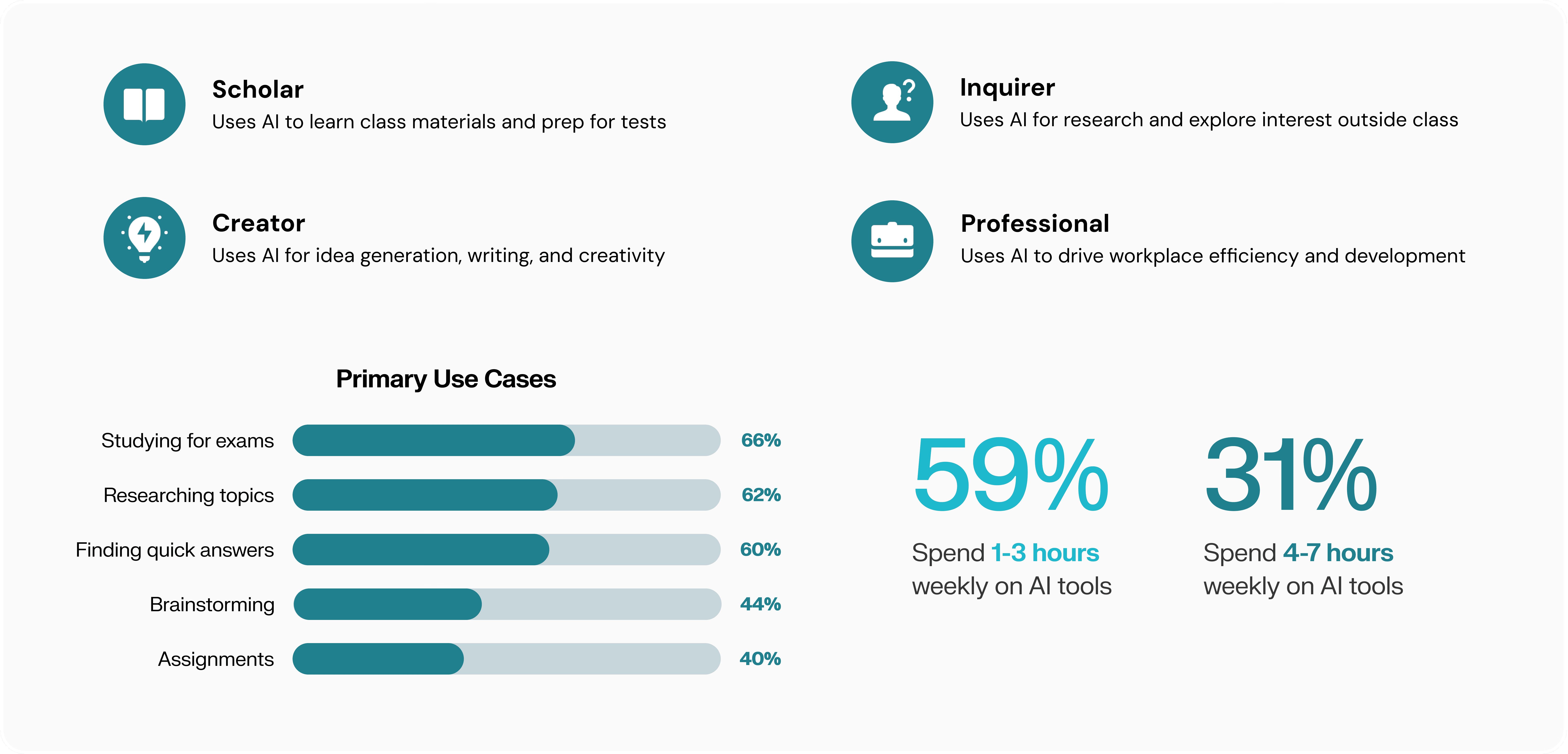
Students + AI Tools: Diverse Uses, Different Goals
In order to gain product feedback on Perplexity and other competitors, we surveyed students at UCLA across 4 user types. With 135+ survey respondents and 30+ interviews across 35+ STEM & Humanities majors, we discovered that:
USER RESEARCH
Students + AI Tools: Diverse Uses, Different Goals
In order to gain product feedback on Perplexity and other competitors, we surveyed students at UCLA across 4 user types. With 135+ survey respondents and 30+ interviews across 35+ STEM & Humanities majors, we discovered that:
IDEATION AND SYNTHESIS
Identifying Key Focus Areas
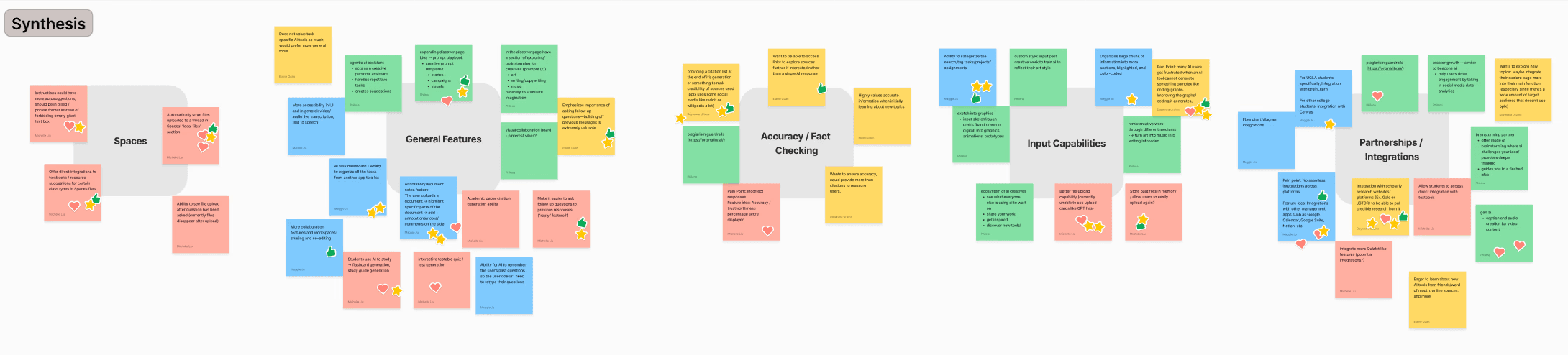
Based on data, we identified themes and brainstormed a range of features, bringing them to discover which resonated most.
IDEATION AND SYNTHESIS
Identifying Key Focus Areas
Based on data, we identified themes and brainstormed a range of features, bringing them to discover which resonated most.
THE GOAL
Reducing Time Lost to Context-Switching Between AI Tools
IDEATION AND SYNTHESIS
After discussions with the design team, I took ownership of workflow efficiency and narrowed the problem space to a key question:
How can I help students capture and organize insights without disrupting their workflows?
THE GOAL
Reducing Time Lost to Context-Switching Between AI Tools
IDEATION AND SYNTHESIS
After discussions with the design team, I took ownership of workflow efficiency and narrowed the problem space to a key question:
How can I help students capture and organize insights without disrupting their workflows?
DESIGN EXPLORATION
Annotation
Students were losing time switching between tabs — copying text into separate tools just to highlight or annotate. To address this, I designed an inline annotation feature that allowed users to stay within the same workspace.
DESIGN EXPLORATION
Annotation
Students were losing time switching between tabs — copying text into separate tools just to highlight or annotate. To address this, I designed an inline annotation feature that allowed users to stay within the same workspace.
DESIGN PIVOT
From Annotation to Saving Quotes
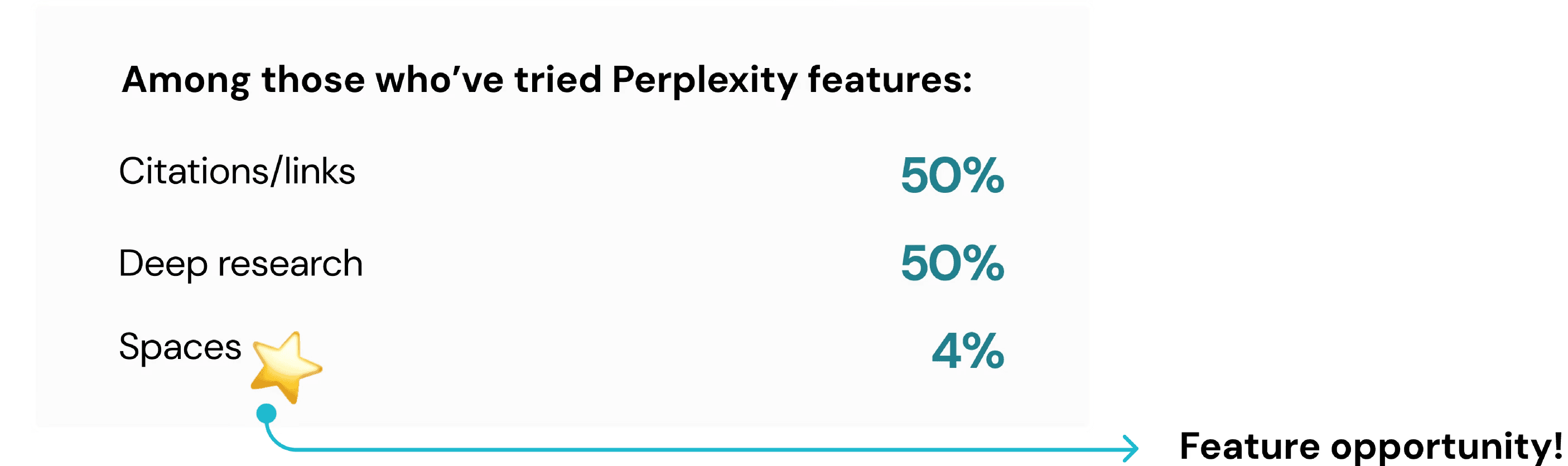
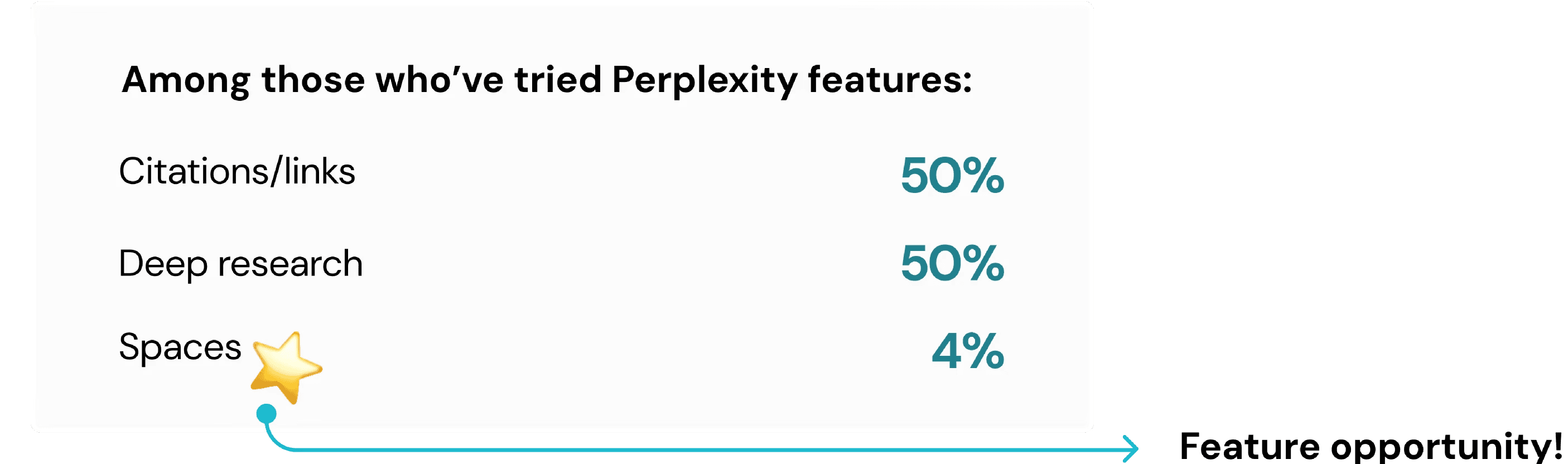
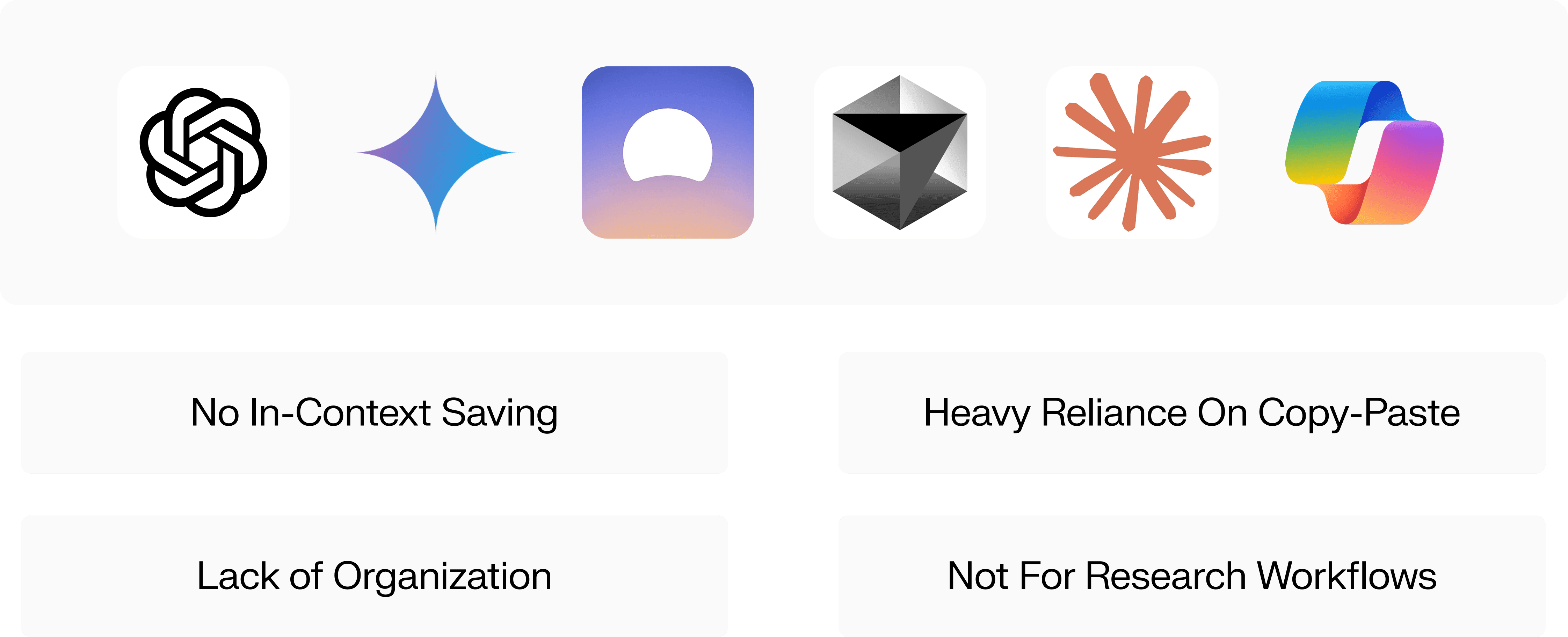
Additional user testing changed my original idea. Students didn’t just want to annotate — they wanted a quick way to save quotes and insights directly in Perplexity.
Instead of creating a separate tool, I built on Spaces, Perplexity’s collaborative folders, to become a lightweight text-saving hub.
DESIGN PIVOT
From Annotation to Saving Quotes
Additional user testing changed my original idea. Students didn’t just want to annotate — they wanted a quick way to save quotes and insights directly in Perplexity.
Instead of creating a separate tool, I built on Spaces, Perplexity’s collaborative folders, to become a lightweight text-saving hub.
USER FLOWS
Additional Design Explorations
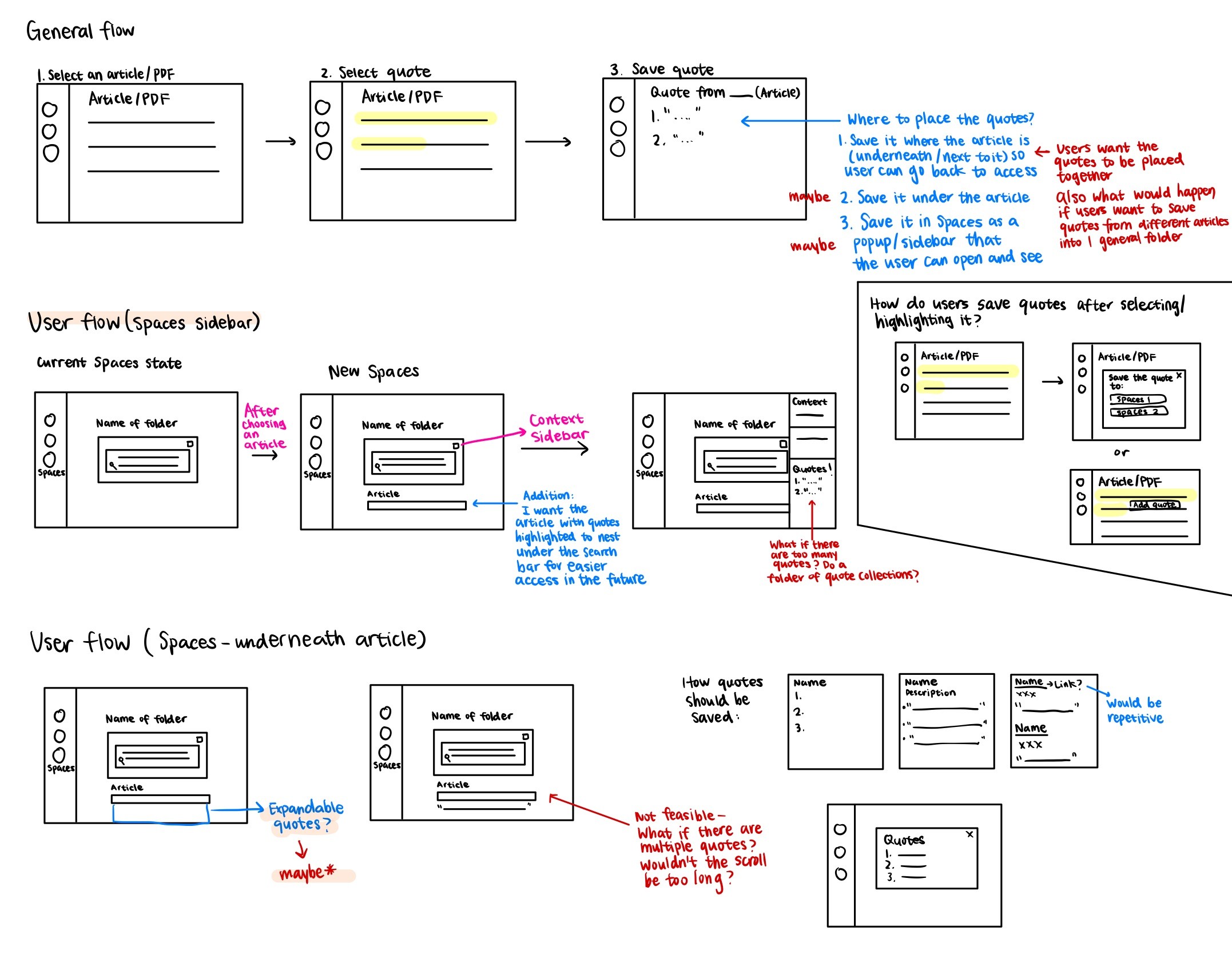
I sketched out low-fidelity concepts to visualize how to integrate the feature into Perplexity.
USER FLOWS
Additional Design Explorations
I sketched out low-fidelity concepts to visualize how to integrate the feature into Perplexity.
USABILITY TESTING
Discovering New Perspective and Iterating
I interviewed a diverse group of users — including those who had never used Perplexity and experienced Perplexity users - to ensure the design is intuitive for both new and returning users.
Key Change #1: Adding to New Spaces
90% of users preferred the inline dropdown over a popup for its speed. It lets them highlight, save, and keep reading without interruption, while also adding to a new Space without leaving the page.

Key Change #2: Adding to New Spaces
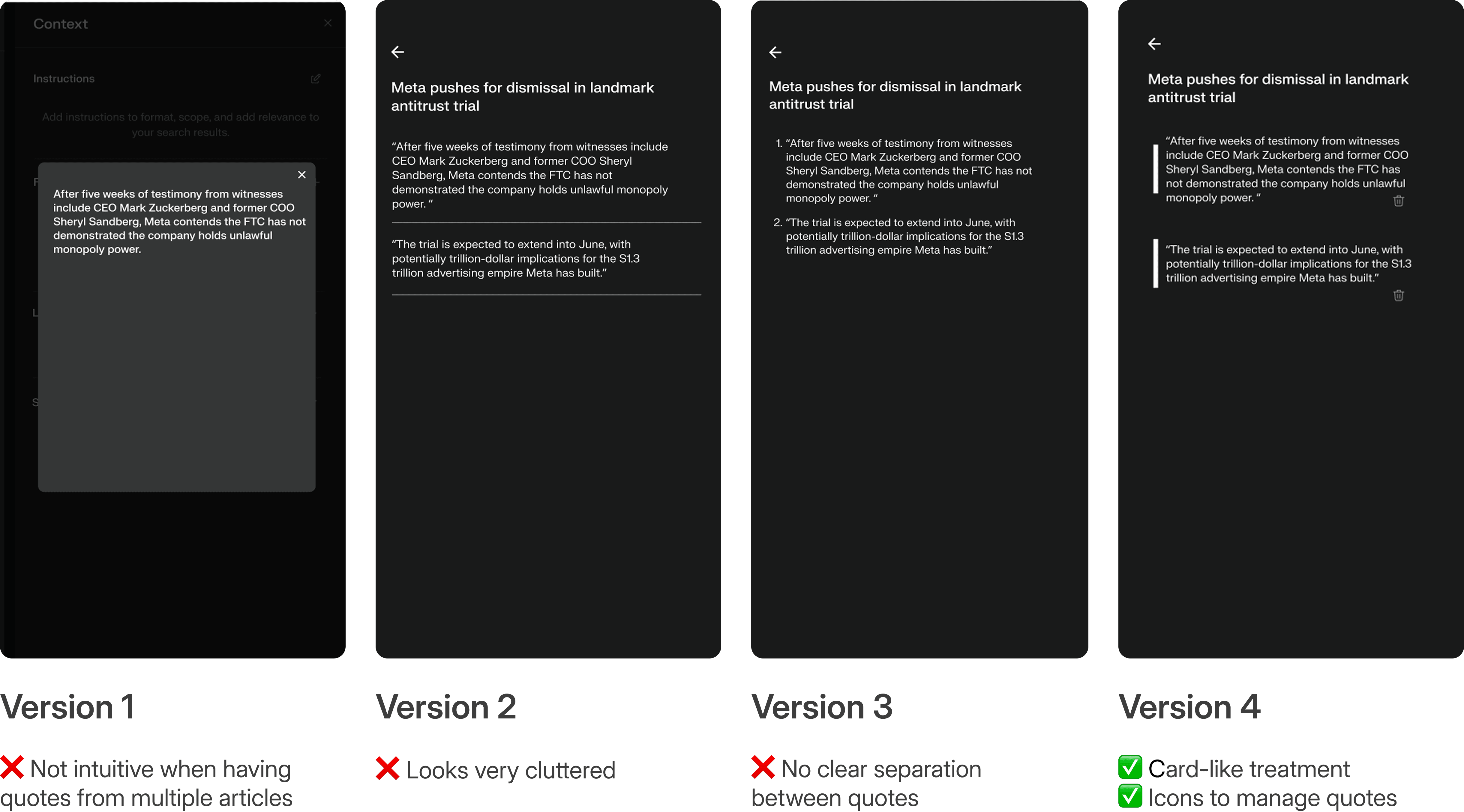
I explored different visual styles for how saved quotes would appear. Through user testing, I found that users preferred a cleaner look.
USABILITY TESTING
Discovering New Perspective and Iterating
I interviewed a diverse group of users — including those who had never used Perplexity and experienced Perplexity users - to ensure the design is intuitive for both new and returning users.
Key Change #1: Adding to New Spaces
90% of users preferred the inline dropdown over a popup for its speed. It lets them highlight, save, and keep reading without interruption, while also adding to a new Space without leaving the page.
Key Change #2: Adding to New Spaces
I explored different visual styles for how saved quotes would appear. Through user testing, I found that users preferred a cleaner look.
Takeaways
Navigating ambiguity with curiosity
This project gave me a firsthand look at what it means to work with a product team and design within an established design system. When we started with a broad prompt, I learned to ask questions early, clarify direction with the team, and ground decisions in user research.
Cross-functional collaboration drives stronger outcomes
Working closely with PMs and PMMs helped me connect design decisions back to product goals. It reminded me that good design is not just about making features functional, but making sure they launch with the right purpose.
Small details shape the experience
Through usability testing and user conversations, I saw how small interaction details, like confirmation states or button placement, could make the difference between hesitation and ease of use.
Takeaways
Navigating ambiguity with curiosity
This project gave me a firsthand look at what it means to work with a product team and design within an established design system. When we started with a broad prompt, I learned to ask questions early, clarify direction with the team, and ground decisions in user research.
Cross-functional collaboration drives stronger outcomes
Working closely with PMs and PMMs helped me connect design decisions back to product goals. It reminded me that good design is not just about making features functional, but making sure they launch with the right purpose.
Small details shape the experience
Through usability testing and user conversations, I saw how small interaction details, like confirmation states or button placement, could make the difference between hesitation and ease of use.